Ultimatize: The Bold Choice for Standout Designs
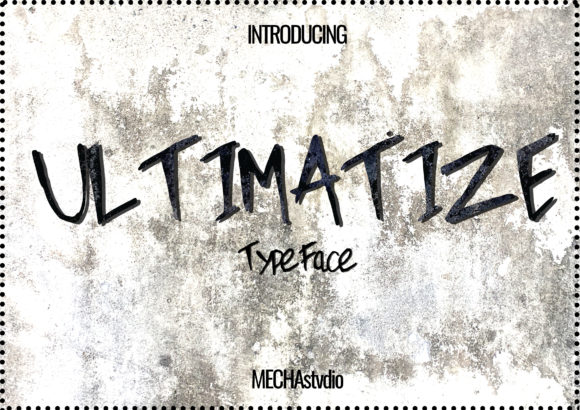
If you are looking to make a statement that cannot be ignored, Ultimatize is the display font designed to deliver exactly that. It is not merely a typeface; it is a visual strategy. Characterized by its super cool and bold aesthetic, this font commands attention in a crowded digital landscape or on a physical product shelf. Whether you are designing t-shirts, sportswear, logos, advertisements, or clothing lines, Ultimatize offers the structural weight and personality needed to cut through the noise.
However, just because a font is bold does not mean it should be used everywhere. Many designers and business owners fall into the trap of assuming that "loud" typography automatically equals "effective." While Ultimatize is undeniably striking, using it incorrectly can lead to poor legibility, brand dilution, and a lack of professionalism. To get the most out of this powerful tool, you need to understand its specific strengths and limitations before committing to your next project.
Understanding the Power of Ultimatize
At its core, Ultimatize is a display font. This classification is crucial. Unlike body text fonts like Arial or Roboto, which are designed for long-form reading, display fonts are engineered for impact at large sizes. Ultimatize excels in scenarios where the message must be immediate and visceral. Its thick strokes and distinctive shapes create a sense of energy and movement that is perfect for active lifestyles and modern branding.
When applied correctly, this font elevates a simple graphic tee into a fashion statement. It transforms a static advertisement into a dynamic call to action. For entrepreneurs and small business owners, choosing the right typography is often the difference between a design that feels generic and one that feels premium. Ultimatize provides that premium, high-energy feel without requiring complex graphic elements.
Pro Tip: Think of Ultimatize as the voice in a room that everyone stops to listen to. It is not meant to whisper; it is meant to announce.
Common Pitfalls When Using Bold Display Fonts
Even experienced creators sometimes struggle with the nuances of heavy display typefaces. Here are the most frequent mistakes we see when Ultimatize is introduced into a workflow, along with practical ways to correct them.
Overusing the Font Across All Elements
The biggest mistake is treating Ultimatize as an all-purpose solution. You might be tempted to use it for headlines, subheadings, buttons, and even body copy. This approach almost always results in visual fatigue. When every element screams for attention, nothing stands out. The design becomes chaotic and difficult to read.
- The Mistake: Applying Ultimatize to long paragraphs of text or small interface elements.
- The Consequence: Readers will skip over your content entirely because their eyes cannot track the dense, heavy characters.
- The Fix: Reserve Ultimatize strictly for primary headlines, large banners, and logo lockups. Pair it with a clean, neutral sans-serif or serif font for any supporting text.
Neglecting Spacing and Kerning
Bold fonts have a unique optical density. Because the letterforms are so thick, they naturally take up more visual space than standard fonts. A common error is setting the default spacing provided by design software without adjustment.
If letters are too close together in Ultimatize, they can merge into an unrecognizable blob. Conversely, if they are spaced too far apart, the connection between letters breaks, making the word look disjointed. This affects the perceived quality of your work significantly.
To avoid this, manually adjust the tracking (letter-spacing) slightly wider than you would for a thin font. This creates breathing room and allows the unique details of each character to shine. Always zoom in to 200% or more to check how the curves interact before finalizing your design.
Ignoring Context and Contrast
Another overlooked detail is the background environment. Ultimatize is bold, but it is not magic. If you place this black font on a dark blue background, or a white font on a light gray background, the contrast will fail. The result is a design that looks unfinished and causes eye strain.
This issue is particularly prevalent in web design and mobile app interfaces. If your users cannot distinguish the text from the background, your conversion rates will drop regardless of how cool the font looks. Always ensure there is a stark contrast between your text and its container.
Evaluating Ultimatize Before You Buy or Download
Before you integrate Ultimatize into your commercial projects, there are several checks you should perform. This due diligence protects your investment and ensures legal compliance.
- Check the License Terms: Not all fonts are created equal. Some licenses restrict usage to personal projects only, while others allow unlimited commercial use. Ensure your license covers the specific medium you are targeting, whether that is print, web, or merchandise like t-shirts. Failing to do this can lead to costly legal issues later.
- Test Scalability: Download the file and test it at various sizes. Does it hold up well when shrunk down for a social media icon? Does it look crisp when blown up for a billboard? A font that looks great at 72 pixels might lose definition at 8 points.
- Verify Language Support: If you plan to target a global audience, check if Ultimatize supports the necessary character sets. Does it include accents, symbols, or non-Latin scripts required for your region?
- Analyze Legibility: Print a sample page. Sometimes screens lie. A font that appears sharp on a monitor might look muddy on paper depending on the ink absorption and paper texture.
Strategic Applications for Ultimatize
Once you have avoided the common traps, the possibilities with Ultimatize expand rapidly. Its versatility makes it a favorite among professionals in various fields.
Sportswear and Apparel Design
In the world of athletic wear, energy and motion are key selling points. Ultimatize captures this spirit perfectly. When printed on jerseys, hoodies, or shorts, the bold lines convey strength and performance. However, remember to consider the fabric texture. On a mesh material, very fine details in the font might get lost, so stick to the bolder weights of the family.
Logos and Brand Identity
A logo needs to be memorable. Ultimatize provides a strong foundation for brand marks that need to look authoritative. It works exceptionally well for fitness brands, gaming companies, and lifestyle startups. Just ensure you pair it with a simpler secondary mark to balance the composition.
Advertising and Marketing Materials
In a sea of flat designs, Ultimatize acts as a hook. Use it for sale announcements, event posters, and email headers. The goal here is to stop the scroll or catch the eye from a distance. By limiting its use to these high-impact areas, you maximize its effectiveness without overwhelming your audience.
Moving Forward with Confidence
Choosing the right typography is a decision that impacts the success of your communication. Ultimatize is a fantastic resource for anyone needing a bold, modern look, but it requires respect and careful handling. By avoiding the pitfalls of overuse, neglecting spacing, and ignoring context, you can leverage its full potential.
Remember, good design is not about using the loudest tools available; it is about using the right tools for the job. When you apply Ultimatize with intention, pairing it with thoughtful layout and complementary colors, you create work that is not only visually stunning but also functional and effective. Take the time to test, refine, and evaluate your designs, and you will find that this font can truly elevate your projects to the next level.